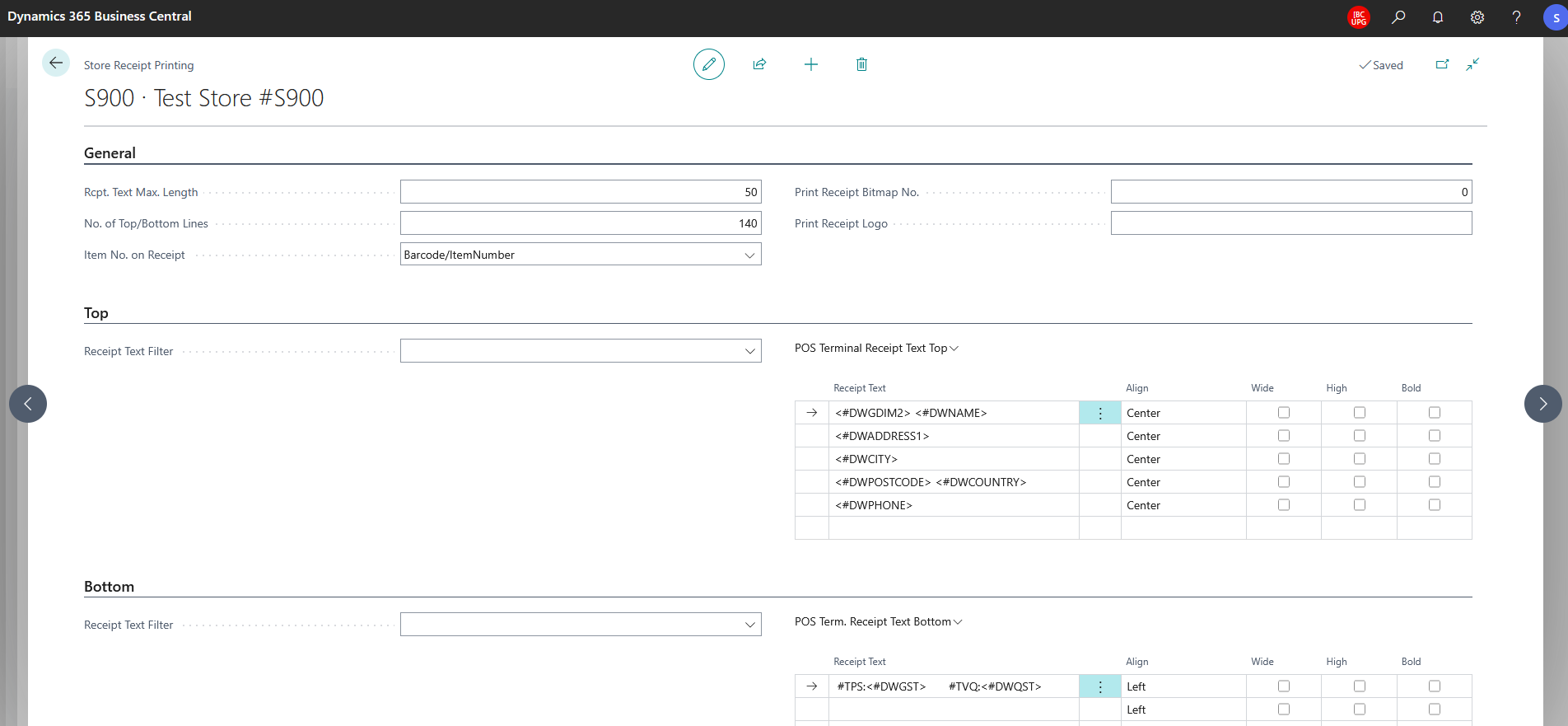
Receipt Dynamic Placeholders
The Receipt Dynamic Placeholders functionality allows for the use of special placeholders in designing Receipt Headers. Footers, and Item Description content that will be replaced when a Receipt is printed.
This is helpful in maintaining Receipt Header/Footer information across many stores in an automated fashion - no need to manually enter Store No., Name, Addresses, or Tax information.
Available Placeholders
All placeholders should be enclosed with <# and > such as <#DWSTORENO>
| Placeholder | Value | Note |
|---|---|---|
| DWSTORENO | Store's No. | |
| DWADDRESS1 | Store's Address 1 | |
| DWADDRESS2 | Store's Address 2 | |
| DWCITY | Store's City | |
| DWPOSTCODE | Store's Post Code | |
| DWPROVINCE | Store's Province/State | Field is also referred to as "County" |
| DWCOUNTRY | Store's Country/Region Code | |
| DWNAME | Store's Name | |
| DWPHONE | Store's Phone No. | |
| DWATTRIB1 | Store's Attrib 1 Code | See Attribute Setup's Store Hard Attribute 1 |
| DWATTRIB2 | Store's Attrib 2 Code | See Attribute Setup's Store Hard Attribute 2 |
| DWATTRIB3 | Store's Attrib 3 Code | See Attribute Setup's Store Hard Attribute 3 |
| DWATTRIB4 | Store's Attrib 4 Code | See Attribute Setup's Store Hard Attribute 4 |
| DWATTRIB5 | Store's Attrib 5 Code | See Attribute Setup's Store Hard Attribute 5 |
| DWGDIM1 | Store's Global Dimension 1 Code | |
| DWGDIM2 | Store's Global Dimension 2 Code | |
| DWGST | Company Information's Tax Registrion No. | Field is also referred to as "VAT Registration No." or "GST Registration No." |
| DWQST | Company Information's QST Registrion No. | Only present in Business Central CA localization |
Partners and Customers can extend this functionality by leveraging the OnReplacePOSPrintTokens event.
Example Setup of Receipt